AI is changing how businesses approach automation.
Traditional business automation has typically relied on predefined rules:
If this happens, do that.
AI business automation introduces another layer. AI can interpret information, understand context, generate responses, classify data and, in some systems, take actions across multiple steps of a workflow.
This makes it possible to automate processes that previously required more human involvement.
For small businesses in particular, AI automation can help reduce repetitive administrative work, improve consistency and allow lean teams to handle more processes without adding the same amount of manual work.
But AI automation is not simply about replacing people with software.
The more practical question is:
Which business processes should be automated, and where should people remain involved?
This guide explains what AI business automation is, where it can be used, how AI workflow automation works and how small businesses can start introducing it.
What Is AI Business Automation?
AI business automation is the use of artificial intelligence to automate business processes that would otherwise require manual work.
Traditional automation usually follows predefined instructions.
For example:
When a customer submits a form → create a CRM record → send an email.
AI automation can handle more variable information.
For example:
A customer sends a message → AI identifies the customer's request → extracts relevant information → determines the appropriate workflow → updates the relevant system → prepares or sends a response.
The difference is that AI can work with less structured information.
This makes AI particularly useful for processes involving emails, documents, conversations, receipts, invoices, customer requests and other business information that is difficult to handle with simple rules alone.
AI Automation vs AI Productivity
AI productivity and AI automation are related, but they are not the same.

AI productivity helps a person complete a task.
For example:
An employee asks AI to summarise a customer email.
The employee then decides what to do.
AI automation changes the workflow itself.
For example:
A customer email arrives → AI identifies the request → the customer record is updated → the appropriate team is notified → a response is prepared.
The first improves individual productivity.
The second automates part of the business process.
This distinction is important because not every AI use case needs automation.
If an employee only needs occasional help writing an email, an AI productivity tool may be enough.
If hundreds of similar requests need to be processed every month, workflow automation may provide much more value.
Why Are Businesses Using AI Automation?
Businesses typically look at AI automation for three main reasons: reducing repetitive work, improving operational consistency and allowing teams to scale.
Reduce repetitive work
Many business processes contain repetitive steps.
Examples include:
- Entering data
- Processing receipts
- Updating CRM records
- Preparing invoices
- Sorting customer enquiries
- Creating reports
- Sending follow-up messages
- Moving information between applications
AI can potentially handle some or all of these steps.
Reduce manual errors
Whenever people repeatedly copy information from one system to another, there is a possibility of mistakes.
Automation can reduce unnecessary manual data entry and create more consistent processes.
This does not mean AI systems are automatically error-free. Automated processes still need appropriate validation and monitoring.
Help small teams scale
A small business may not have enough employees to manually handle every operational process as the company grows.
AI automation can allow the existing team to manage higher volumes of work without adding manual steps at the same rate.
Improve response times
Automated workflows can operate continuously rather than waiting for an employee to become available.
For example, an AI system may be able to classify an incoming enquiry immediately and route it to the appropriate workflow.
Which Business Processes Can AI Automate?
The potential applications are broad, but some processes are particularly suitable for AI automation.

1. AI Finance Automation
Finance is one of the most practical areas for business automation because many processes involve structured and repetitive information.
AI finance automation can potentially assist with:
- Expense management
- Receipt processing
- Invoice processing
- Transaction recording
- Financial document extraction
- Expense categorisation
- Cash-flow information
- Financial reporting
For example:
Receipt uploaded → information extracted → expense categorised → transaction recorded → financial dashboard updated.
Instead of requiring someone to manually read and enter every receipt, software can perform the repetitive processing steps.
Financial information is sensitive, however. Businesses should carefully evaluate data security, accuracy, permissions and human review requirements before automating financial workflows.
2. AI Receipt Automation
Receipts are a simple example of a process that can contain significant repetitive work.
A traditional process might look like:
Receive receipt → read receipt → enter supplier → enter amount → select category → record transaction → store receipt.
AI-powered receipt processing can potentially automate much of this workflow.
The AI can extract information from the receipt and organise it into structured business data.
For a business processing a large number of receipts, even small time savings per receipt can accumulate into significant operational savings.
3. AI Invoice Automation
Invoices can also contain repetitive administrative work.
AI invoice automation can help with:
- Extracting invoice information
- Identifying suppliers
- Reading invoice amounts
- Organising invoice records
- Matching information
- Preparing accounting data
- Routing invoices for approval
The exact level of automation depends on the software and the business process.
For sensitive financial workflows, businesses may still want an employee to review information before it becomes part of the official financial record.
4. AI Transaction Automation
Businesses generate transactions every day.
Recording and organising those transactions manually can become increasingly time-consuming as transaction volume grows.
AI transaction automation can help businesses capture information and turn it into structured records.
For example:
Transaction information received → AI identifies relevant details → transaction categorised → record created → dashboard updated.
This can reduce the amount of manual data entry required by business owners and administrative staff.
5. AI Administrative Automation
Administration often contains tasks that are necessary but repetitive.
Examples include:
- Data entry
- Document organisation
- Form processing
- Email routing
- Scheduling
- Report preparation
- Record updates
- Internal notifications
AI can help interpret unstructured information and determine which administrative workflow should happen next.
This is particularly useful when information arrives through different channels such as email, documents or online forms.
6. AI Sales Automation
Sales automation has traditionally focused on rules-based CRM workflows.
AI can extend these capabilities by helping systems understand customer information and determine appropriate next steps.
Potential applications include:
- Lead qualification
- Lead research
- CRM updates
- Sales follow-ups
- Email personalisation
- Meeting summaries
- Opportunity analysis
- Sales reporting
For example:
New lead arrives → AI analyses the information → lead is classified → CRM is updated → follow-up workflow begins.
Sales teams can therefore spend less time on administrative CRM work and more time interacting with customers.
7. AI Customer Service Automation
Customer service is another major area for AI automation.
AI can potentially handle:
- Frequently asked questions
- Basic customer enquiries
- Request classification
- Conversation summaries
- Ticket routing
- Response generation
- Knowledge-base searches
A useful model is to allow AI to handle straightforward requests while escalating complex or sensitive cases to people.
This creates a hybrid workflow rather than requiring businesses to choose between completely manual customer service and completely autonomous AI.
8. AI Marketing Automation
AI can also be integrated into marketing workflows.
Potential applications include:
- Content creation
- Campaign planning
- Audience segmentation
- Email personalisation
- Social media content
- SEO research
- Lead nurturing
- Performance analysis
AI can help reduce the amount of manual work involved in producing and distributing marketing content.
However, marketing automation should still be guided by a clear strategy. Producing more content does not automatically produce better marketing results.
9. AI Operations Automation
Business operations often sit between different departments and systems.
Operations automation can connect processes involving:
- Sales
- Finance
- Customer service
- Administration
- Inventory
- Reporting
- Internal communication
For example:
A sale is completed → customer information is updated → invoice is created → finance records are updated → fulfilment is notified → customer receives confirmation.
This type of connected workflow is where AI automation can become significantly more valuable than automating individual tasks separately.
What Is AI Workflow Automation?
AI workflow automation refers to using AI as part of a sequence of business activities.
A simple workflow might look like:
Input → AI interpretation → Decision → Action → Record
For example:
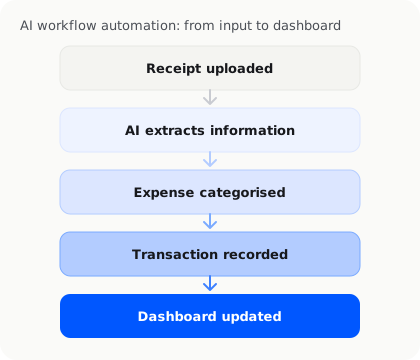
The important part is that the AI is not simply generating an answer.
It is participating in a business process.
This is why AI workflow automation is becoming an increasingly important category within business software.
Traditional Automation vs AI Automation
The two approaches can work together.
| Traditional automation | AI automation |
|---|---|
| Rule-based | Context-aware |
| Predictable inputs | Can handle less structured information |
| "If X, do Y" | Can interpret information before deciding |
| Best for structured processes | Useful for documents, text and conversations |
| Usually deterministic | May require validation |
| Easy to define rules | Can handle more variation |
Traditional automation remains highly useful.
A business does not need AI for every automated process.
If a workflow is completely predictable, traditional rules may be simpler and more reliable.
AI becomes particularly useful when the workflow involves information that requires interpretation.
What Are AI Agents?
AI agents are a more advanced form of AI automation.
A traditional automation workflow follows predefined instructions.
An AI agent can potentially:
- Understand a goal
- Examine available information
- Decide what action is appropriate
- Use connected tools
- Complete multiple steps
- Check the result
- Continue or escalate when necessary
For example, an AI business agent might receive a customer request and determine which business system needs to be updated, rather than simply following a fixed rule for every possible message.
The capabilities of AI agents vary considerably between products, so businesses should evaluate what an agent can actually access and do rather than assuming that all AI agents are fully autonomous.
AI Business Automation for Small Businesses
Large companies have traditionally had the resources to build complex automation systems.

Small businesses often do not.
This is one reason AI automation can be particularly relevant to small businesses and solo founders.
A small company may have one person handling:
- Sales
- Customer communication
- Invoicing
- Expenses
- Administration
- Reporting
- Operations
The problem is not necessarily that the work is complicated.
It is that there are too many repetitive processes competing for the same person's time.
AI automation can help turn some of these processes into systems rather than recurring manual tasks.
How to Identify Processes Suitable for AI Automation
Not every business process should be automated.
A useful starting point is to look for processes with several of these characteristics:
High frequency
The task happens every day or every week.
Repetitive steps
The process follows a relatively consistent pattern.
Large amounts of manual data entry
People repeatedly copy information between systems.
Unstructured information
Emails, documents, receipts or conversations need to be interpreted.
Clear outcomes
The business knows what should happen when the process is completed.
Measurable time cost
The business can estimate how much time the process currently consumes.
For example, processing five receipts per month may not justify an automation project.
Processing hundreds of receipts may be a different situation.
What Should Not Be Fully Automated?
Automation should not be treated as an objective by itself.
Some decisions require human involvement.
These may include:
- High-value financial decisions
- Sensitive customer situations
- Legal decisions
- Strategic decisions
- Complex negotiations
- Unusual transactions
- Decisions with significant consequences
In these situations, AI can still assist by collecting information, preparing recommendations or performing preliminary processing.
The final decision can remain with a person.
This creates a human-in-the-loop approach to AI automation.
How to Start Automating a Business Process
A business does not need to automate its entire operation at once.
A practical process is:
Step 1: Map the current workflow
Write down every step from beginning to end.
Step 2: Find repetitive steps
Identify where employees repeatedly enter, copy, classify or organise information.
Step 3: Determine where AI is useful
Ask whether the task requires interpretation rather than simple rules.
Step 4: Choose the appropriate software
The right solution may be an AI productivity tool, workflow automation platform, specialised business software or AI agent.
Step 5: Start with a limited workflow
Test one process before expanding.
Step 6: Keep appropriate human review
Decide which steps require approval or verification.
Step 7: Measure the results
Track:
- Time saved
- Errors reduced
- Processing volume
- Operating cost
- Employee workload
- Customer response time
If the automation does not create measurable value, there may be a better process to automate.
Common Mistakes When Automating with AI
AI automation can create problems if implemented without understanding the underlying process.
Automating a bad process
If a workflow is inefficient before automation, automating it may simply make the inefficient process run faster.
Automating too much at once
Large automation projects can become difficult to manage.
Starting with a small workflow reduces risk.
Ignoring data quality
AI systems depend on the information they receive. Poor or incomplete data can lead to poor outputs.
Removing human review too early
Important financial, customer or operational decisions may still require human approval.
Buying too many disconnected tools
Adding multiple automation platforms can create more complexity.
Where possible, businesses should consider how systems connect and where information is stored.
InstantFlow AI and Business Operations
InstantFlow AI is designed around the business-operations side of AI.
It is built for solo founders and small businesses that need to manage recurring operational work such as:
- Expenses
- Receipts
- Quotes
- Invoices
- Transactions
- Cash flow
- Back-office administration
The underlying concept is different from using an AI assistant to write an email.
An AI assistant helps a person complete a task.
An AI business operations platform can help manage the recurring process itself.
For example, instead of manually handling every receipt and transaction, a business can use software to capture information, organise it and maintain an operational view of its financial activity.
This is particularly relevant for businesses that want the benefits of automation without building a complex enterprise resource planning system.
AI Business Automation and the Future of Work
The direction of AI is moving from isolated assistance towards increasingly connected workflows.
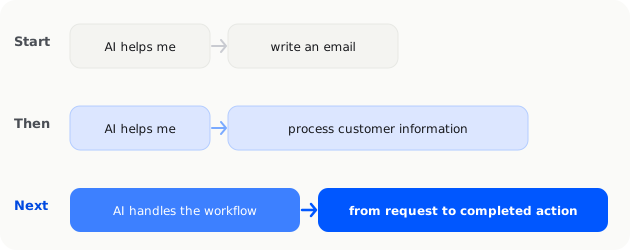
A business might begin with:
AI helps me write an email.
Then move to:
AI helps me process customer information.
And eventually:
AI handles the workflow from customer request to completed business action.
This progression does not mean every business process will become autonomous.
Instead, businesses are likely to combine:
- Human judgment
- AI assistants
- Traditional automation
- AI workflow automation
- AI agents
- Business software
The objective is to create an operating environment where repetitive work is handled efficiently while people remain responsible for decisions that require context and accountability.
Frequently Asked Questions
What is AI business automation?
AI business automation is the use of artificial intelligence to automate business processes that would otherwise require manual work. It can involve interpreting documents, classifying information, making workflow decisions and taking actions across connected systems.
What business processes can AI automate?
AI can potentially automate parts of finance, administration, sales, customer service, marketing and operations. Common examples include receipt processing, invoice processing, transaction recording, CRM updates, customer enquiries and workflow management.
What is AI workflow automation?
AI workflow automation uses AI as part of a sequence of business activities. Instead of simply generating information, the AI can interpret an input and help trigger or complete the next steps in a business process.
Can AI automate accounting and finance?
AI can automate or assist with parts of finance and accounting, including receipt processing, invoice processing, transaction recording, data extraction and expense organisation. Financial workflows should include appropriate verification, security and human oversight.
Is AI automation suitable for small businesses?
Yes. Small businesses can use AI automation to reduce repetitive administrative and operational work. It can be particularly useful for businesses where a small team is responsible for many recurring processes.
What is the difference between AI automation and AI agents?
AI automation usually refers to automated workflows that include AI capabilities. AI agents can potentially handle more flexible, multi-step tasks by interpreting information, deciding what action to take and using connected tools. The exact capabilities depend on the specific system.
Conclusion
AI business automation is moving beyond simple rule-based workflows.
Businesses can now use AI to interpret documents, process information, manage customer requests, organise financial data and support multi-step operational workflows.
For small businesses, the opportunity is particularly practical.
The goal is not to automate everything.
It is to identify the repetitive processes that consume time, determine where AI can safely handle part of the work, and keep people involved wherever judgment and accountability are important.
The result can be a business that relies less on repetitive manual processes and more on connected, intelligent workflows.
That is the shift from using AI as a productivity tool to using AI as part of the business operation itself.

Michael Tang · Digital Content Manager
Focused on digital content, AI tools and enterprise technology trends, researching and distilling practical information that turns complex technology and AI applications into clear, accessible content for business owners and professionals.