AI has moved quickly from experimentation to practical business use.
Businesses can now use AI to analyse information, support employees, automate workflows, process documents, assist customers, manage data and operate AI agents.
But knowing what AI can do is different from knowing how to use AI effectively in a real business.
Many companies start by testing a chatbot or generative AI application. They may create a few prompts, generate some content and experiment with AI assistants.
The next challenge is turning those experiments into repeatable business processes that produce measurable value.
That is where practical AI becomes important.
Practical AI is not about using AI simply because the technology is available. It is about applying AI to real business problems, integrating it into existing workflows and measuring whether it produces useful outcomes.
What Is Practical AI?
Practical AI means applying artificial intelligence to real-world tasks and business problems in a way that produces measurable value.
Instead of asking:
"What can AI do?"
a practical AI approach asks:
"What problem can AI solve for this business?"
That could mean:
- Reducing repetitive administrative work
- Improving customer response times
- Processing business documents
- Analysing data
- Supporting employees
- Automating workflows
- Improving sales processes
- Managing financial information
- Creating business reports
- Supporting decision-making
The technology is important, but the business outcome is the primary objective.
Current enterprise AI guidance increasingly focuses on moving from experimentation toward adoption, responsible deployment and measurable business outcomes rather than treating AI experimentation as the final goal.
Why Practical AI Matters
AI tools are becoming easier to access.
The challenge is no longer simply getting access to an AI model.
The challenge is figuring out how AI fits into existing work.
A business might already have:
- CRM software
- Accounting software
- Customer service systems
- Project management tools
- Documents
- Spreadsheets
- Internal knowledge bases
The practical AI question is how to connect AI to these systems and workflows without creating unnecessary complexity.
For example:
Customer enquiry → AI understands the request → relevant information is retrieved → CRM is updated → response is prepared.
That is more useful than simply having an AI chatbot available on the side.
Practical AI vs AI Experimentation
There is a major difference between experimenting with AI and implementing AI.
AI experimentation
An employee opens an AI assistant and asks it to:
- Write an email
- Summarise a document
- Generate ideas
- Analyse information
This can be useful for learning what AI can do.
Practical AI implementation
The business identifies a recurring process and incorporates AI into it.
For example:
Every new customer enquiry is automatically classified and routed to the appropriate workflow.
The second approach is more repeatable and easier to measure.
AI experimentation is often the starting point.
Practical implementation is where businesses begin to generate operational value.
Practical AI Use Cases for Business
There are many ways businesses can apply AI without building a completely new technology stack.
1. AI for Employee Productivity
Employees can use AI to reduce the time spent on everyday work.
Examples include:
- Writing
- Research
- Meeting summaries
- Document analysis
- Presentations
- Data analysis
- Information retrieval
AI can act as an assistant that helps employees complete tasks faster.
The objective is not simply to increase the number of tasks completed. It is to reduce repetitive work and allow employees to spend more time on higher-value activities.
Microsoft's current AI learning resources similarly position AI around practical workplace productivity, role-specific use cases and applying AI capabilities to real business work.
2. AI for Customer Service
Customer service contains many repetitive interactions.
Practical AI applications include:
- FAQ responses
- Customer enquiry classification
- Ticket routing
- Conversation summaries
- Knowledge-base search
- Response drafting
- Customer information retrieval
A business can start by using AI to assist customer service employees before allowing AI to handle selected enquiries directly.
This creates a gradual path towards greater automation.
3. AI for Sales
Sales teams can use AI to reduce administrative work around selling.
Potential applications include:
- Lead research
- Lead qualification
- CRM updates
- Sales email preparation
- Meeting summaries
- Follow-up reminders
- Customer research
- Opportunity analysis
For example:
Sales call completed → AI summarises the conversation → relevant information is identified → CRM record is updated → follow-up is prepared.
The salesperson can then review the information rather than entering everything manually.
4. AI for Marketing
Marketing teams can use AI throughout the content and campaign process.
Practical applications include:
- Content planning
- Copywriting
- SEO research
- Customer segmentation
- Campaign ideas
- Social media content
- Email campaigns
- Performance analysis
AI can make content production faster, but effective marketing still depends on positioning, customer understanding and human judgment.
The objective should be better marketing processes rather than simply generating more content.
5. AI for Finance
Finance is another area where practical AI can reduce repetitive administrative work.
Potential applications include:
- Receipt processing
- Expense management
- Invoice processing
- Transaction recording
- Document extraction
- Financial information organisation
- Cash-flow analysis
- Reporting
For example:
Receipt uploaded → information extracted → expense categorised → transaction recorded → financial information updated.
This type of workflow can reduce manual data entry.
Financial information is sensitive, so security, accuracy, permissions and human review should be considered before automating important financial processes.
6. AI for Administration
Administrative work is often a strong candidate for practical AI.
Examples include:
- Document processing
- Data entry
- Email classification
- Form processing
- Scheduling
- Record updates
- Report preparation
- Internal notifications
Many administrative processes do not require complex decision-making but consume significant amounts of employee time.
AI can potentially handle the repetitive parts while people remain responsible for exceptions and important decisions.
7. AI for Business Operations
Operations connect many different parts of a business.
AI can help coordinate information across:
- Sales
- Finance
- Customer service
- Administration
- Reporting
- Internal communication
For example:
A customer places an order → customer information is updated → invoice information is created → finance records are updated → fulfilment is notified.
This is where practical AI begins to overlap with workflow automation.
Practical AI Applications vs AI Tools
A business does not necessarily need a new AI tool for every problem.

Sometimes AI can be added to software the business already uses.
For example:
Existing CRM + AI
can improve lead research and follow-up.
Existing document system + AI
can improve search and summarisation.
Existing finance process + AI
can reduce manual data processing.
Existing communication platform + AI
can assist with customer responses.
This approach can make AI adoption easier because employees do not necessarily have to learn an entirely new system.
How to Identify a Practical AI Use Case
The best AI use cases are usually connected to a clear business problem.
Look for processes that are:
Repetitive
The same task happens frequently.
Time-consuming
Employees spend significant time completing it.
Data-heavy
The process involves large amounts of information.
Predictable
There is a reasonably clear desired outcome.
Digitised
The information already exists in digital form or can be captured digitally.
Measurable
The business can determine whether the process has improved.
For example:
Employees spend 10 hours every week processing documents.
This creates a clear starting point.
If AI reduces the workload to 5 hours, the business has a measurable outcome.
Start With the Problem, Not the AI Tool
One of the most common mistakes in AI adoption is starting with technology.
A business sees a new AI platform and asks:
"What can we do with this?"
A more practical approach is:
"Where are we losing time or creating unnecessary manual work?"
Then ask:
"Can AI improve this process?"
This prevents businesses from buying software without a clear use case.
A Practical AI Implementation Process
Businesses can introduce AI gradually.
Step 1: Identify a business problem
Choose a process that creates measurable friction.
For example:
Expense processing takes too much employee time.
Step 2: Map the existing workflow
Write down what currently happens from beginning to end.
For example:
Receive receipt → read receipt → enter information → categorise expense → record transaction → store document.
Step 3: Identify AI opportunities
Determine which steps involve:
- Reading
- Classifying
- Extracting
- Summarising
- Predicting
- Generating
- Deciding
These are often areas where AI can contribute.
Step 4: Choose the right AI solution
Depending on the process, this could be:
- AI assistant
- AI productivity tool
- AI business application
- AI automation platform
- AI agent
- AI business operations platform
Step 5: Start with a controlled test
Use a limited number of users, documents or transactions.
Step 6: Measure the outcome
Track:
- Time saved
- Cost
- Accuracy
- Processing speed
- Employee workload
- Customer response time
Step 7: Expand gradually
If the use case works, apply the same approach to another process.
This is generally more manageable than attempting an organisation-wide AI transformation immediately.
Practical AI and AI-Ready Data
AI quality depends heavily on the information available to it.
A business may have thousands of documents but still struggle to get useful AI results if the information is:
- Poorly organised
- Duplicated
- Outdated
- Inconsistent
- Difficult to access
- Missing important context
This is why AI-ready data is becoming an important part of practical AI.
AI-ready data means information is prepared in a way that AI systems can reliably access, interpret and use.
This can involve:
- Data preparation
- Data cleaning
- Classification
- Metadata
- Standardisation
- Entity matching
- Data governance
Progress's current practical-AI work emphasises preparation, curation and harmonisation as important foundations for reliable and scalable AI workloads.
The broader lesson is simple:
Better AI does not always require a better model. Sometimes it requires better information.
Practical AI and Integrations
AI becomes more useful when it can access the systems where business information already exists.
For example:
Email → AI → CRM
or:
Receipt → AI → finance system
or:
Customer enquiry → AI → support workflow
Integrations allow AI to become part of the business process rather than remaining a separate application.
When evaluating an AI solution, consider what systems it can connect to and what actions it can perform.
Practical AI and AI Agents
AI agents introduce another level of practical AI.
A traditional AI assistant may answer a question.
An AI agent can potentially work towards a goal.
For example:
"Review new customer enquiries and identify which ones require immediate attention."
Depending on the system, the agent could:
- Read incoming enquiries
- Understand the request
- Retrieve customer information
- Prioritise the enquiry
- Update a system
- Notify the appropriate employee
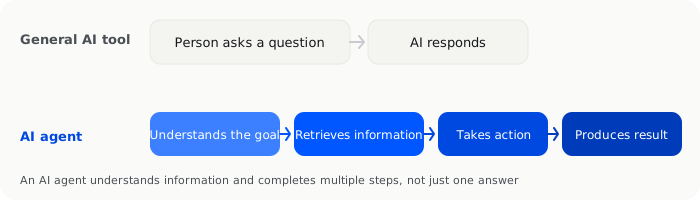
Microsoft's current AI resources distinguish agent development, deployment, governance and continuous improvement as important parts of putting AI agents into organisational use.
AI agents therefore need to be treated as operational systems, not simply as more capable chatbots.
Practical AI and Human Oversight
Practical AI does not mean removing humans from every process.
Some tasks are appropriate for high levels of automation.
Others require human involvement.
A useful model is:
AI handles routine work.
Humans handle exceptions and important decisions.
For example:
AI processes standard expenses.
Human reviews unusual or high-value expenses.
This approach can provide efficiency while maintaining accountability.
Human oversight is particularly important for:
- Financial decisions
- Legal information
- Sensitive customer issues
- Employment decisions
- Security
- High-value transactions
- Strategic decisions
Practical AI, Security and Governance
AI adoption introduces new questions about business data.
Businesses should understand:
- What information AI can access
- Where information is stored
- Who can access it
- What actions AI can take
- How permissions are managed
- How outputs are reviewed
- How activity is monitored
Responsible AI therefore involves more than model accuracy.
It also involves:
- Security
- Privacy
- Governance
- Access control
- Monitoring
- Human oversight
Microsoft's current enterprise AI guidance explicitly incorporates responsible AI, security, cost management and governance into the process of adopting and scaling AI.
Measuring Practical AI ROI
AI should create measurable value.
That value can come from:
Time savings
Employees spend fewer hours on repetitive work.
Cost reduction
The business requires fewer manual resources for the same process volume.
Increased capacity
The same team can process more customers, transactions or documents.
Faster response
Customers receive information more quickly.
Improved consistency
Processes follow a more standardised workflow.
Better information
Employees have easier access to relevant business information.
A simple starting calculation is:
Value created = time saved + cost reduction + additional capacity
This does not capture every benefit, but it provides a practical way to evaluate whether an AI project is worth expanding.
Practical AI vs Full AI Transformation
A business does not need a complete AI transformation to benefit from AI.
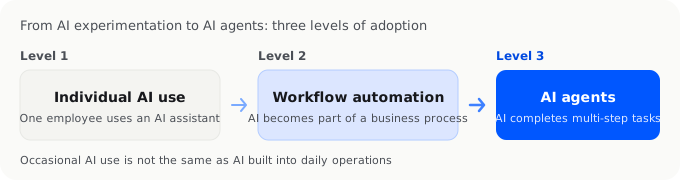
There is a spectrum:
Individual AI use
An employee uses an AI assistant.
↓
Team AI adoption
A department uses AI in everyday workflows.
↓
Workflow automation
AI becomes part of a recurring business process.
↓
Connected AI operations
AI works across multiple systems.
↓
AI agents
AI can perform multi-step tasks.
A business can move along this spectrum gradually.
There is no requirement to jump directly to fully autonomous operations.
Practical AI for Small Businesses
Small businesses can benefit from practical AI because they often operate with limited resources.
A small team may have to manage:
- Sales
- Marketing
- Customer service
- Finance
- Administration
- Operations
AI can provide additional capacity without requiring a separate software system for every individual task.
For example, a business owner could use:
AI productivity tools
for writing and research.
AI automation
for repetitive workflows.
AI business software
for recurring operational processes.
AI agents
for more complex multi-step tasks.
The key is to match the technology to the actual workload.
Where InstantFlow AI Fits
InstantFlow AI is an example of applying AI to practical business operations.
It is designed for solo founders and small businesses that need to manage recurring operational activities such as:
- Expenses
- Receipts
- Quotes
- Invoices
- Transactions
- Cash flow
- Back-office operations
This is different from using a general AI assistant for writing or research.
The purpose is to apply AI to the operational work that businesses need to complete repeatedly.
For example:
Capture business information → organise it → process it → maintain an operational view.
This makes InstantFlow AI relevant to businesses looking to move from simply experimenting with AI towards using AI as part of their everyday operations.
Practical AI in 2026
The AI market is moving from experimentation towards implementation.
Businesses are increasingly looking at:
- AI applications
- AI platforms
- AI automation
- AI agents
- AI-ready data
- Business integrations
- Responsible AI
- Measurable ROI
This means the next stage of AI adoption is less about asking whether AI is useful.
It is about determining where AI creates measurable business value.
The organisations that approach AI practically can focus investment on the workflows where AI can actually improve speed, cost, quality or capacity.
Frequently Asked Questions
What is practical AI?
Practical AI means applying artificial intelligence to real-world problems in ways that create measurable value. Instead of experimenting with AI for its own sake, businesses identify specific workflows or tasks where AI can improve productivity, automation or operations.
What are practical AI applications?
Practical AI applications include customer service, sales, finance, administration, marketing, document processing, data analysis, workflow automation and employee productivity.
How can a business start using AI?
Start by identifying one repetitive or time-consuming process. Map the current workflow, identify where AI can help, test a suitable solution on a small scale and measure the results before expanding.
What is AI-ready data?
AI-ready data is information that has been prepared so AI systems can access and interpret it reliably. This may involve cleaning, organising, classifying, standardising and governing business data.
Can small businesses use AI?
Yes. Small businesses can use AI for productivity, customer service, sales, finance, administration and business operations. The most useful starting point is usually a specific workflow where AI can produce measurable value.
What are AI agents used for?
AI agents can perform multi-step tasks by understanding a goal, accessing information, using connected tools and taking actions. Their capabilities depend on the platform, permissions and integrations available.
Conclusion
Practical AI is about turning artificial intelligence into useful business outcomes.
The starting point is not the newest model or the largest AI platform.
It is the business problem.
Identify where people spend time on repetitive work. Understand the existing workflow. Determine where AI can safely contribute. Choose the appropriate technology, test it and measure the results.
Over time, individual AI tools can become connected workflows, automated processes and AI-enabled business operations.
For small businesses, this creates an opportunity to use AI not simply as a productivity assistant, but as part of the infrastructure that helps the business operate.
The most useful question is therefore not:
"What can AI do?"
It is:
"What should AI do for this business?"

Michael Tang · Digital Content Manager
Focused on digital content, AI tools and enterprise technology trends, researching and distilling practical information that turns complex technology and AI applications into clear, accessible content for business owners and professionals.