
Employee expense management is not only about collecting receipts and recording amounts. As a business grows, employees may be unsure which costs are reimbursable, receipts may lack business context, approval responsibilities may be unclear, and unusual transactions may not be reviewed in time. AI can help check information and surface warnings, but consistent execution still requires a clear expense policy and approval controls.
This guide focuses on designing an employee expense policy, approval permissions, and exception rules. It is not a comparison of AI accounting software or a general receipt-collection workflow. The aim is to give AI a clear policy framework in which it can assist day-to-day review.
Define what employees can claim
An expense policy should start with situations employees actually encounter rather than only listing accounting categories. At minimum, it should explain:
- Which costs qualify as business expenses?
- Which expenses need approval before purchase?
- Are there spending limits, frequency limits, or preferred suppliers?
- What receipt and business-purpose information must be submitted?
- How are entertainment, travel, subscriptions, equipment, and mixed personal expenses handled?
- Who approves a missing receipt or a late submission?

The clearer the policy, the more effectively AI can flag missing information or possible exceptions. When the policy itself is vague, the system can only turn that uncertainty into inconsistent suggestions.
Use approval levels instead of one rule for every expense
Small, recurring, low-risk expenses can use a simpler approval path. Higher-value, unusual, or customer-related purchases may need additional approval. A tiered design avoids two extremes: requiring one person to inspect every transaction or allowing every transaction to pass automatically.
Approval levels can be based on:
- Amount;
- Expense category;
- Department or project;
- Whether the cost will be recharged to a customer;
- Whether the supplier or expense type is new;
- Whether the expense exceeds an employee or department budget.
AI can help route a transaction to the appropriate approval path, but the business should review those rules regularly against how expenses are actually handled.
Use AI to check policy requirements
When an expense is submitted, AI can check whether the document includes a date, amount, merchant, and required business-purpose information. It can also flag possible duplicate receipts, spending above a limit, or unusual suppliers.
These signals should be treated as review prompts, not final decisions. A high-value meal might be a legitimate customer event or a personal expense. The approver needs to consider the context instead of relying only on a “normal” or “exception” label.
Design a clear exception process
One of the most important parts of an expense policy is explaining what happens when a transaction does not fit the normal rules. Common exceptions include:
- A missing receipt or unreadable document;
- Spending above a policy limit;
- A purchase containing both business and personal items;
- A payer who is not the employee submitting the expense;
- A new supplier or expense category;
- A transaction that may already have been submitted by someone else.

Each exception should have an owner, required supporting information, and a response deadline. Do not send every exception into one unowned queue.
Match permissions to responsibilities
An employee expense process usually involves submission, editing, approval, and record keeping. Permissions should follow those responsibilities. For example, an employee may submit and explain their own expense, a team lead may confirm the business need, and a finance owner may review categories and handoff data.
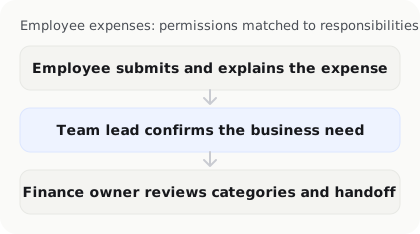
Confirm at least the following:
- Can an employee approve their own expense?
- Can an approver change original information without leaving a history?
- Do high-value expenses need a second approver?
- Are permissions updated when someone changes roles or leaves?
- Does an approved expense return to review when it is edited?
Good permission design does not need to be complicated, but it should make clear who made each decision.
Use activity history to improve the policy
An activity history is not only for investigating problems after they occur. Reviewing returned expenses, missing receipts, over-limit claims, and category changes each month can reveal where the policy is unclear or impractical.
If many employees are asked to provide the same missing information, the policy may need a clearer example. If the same supplier is repeatedly recategorised, the business may need to update a default rule or train the person responsible. Policy improvements should be based on actual records rather than assumptions.
Test AI expense controls with realistic cases
Before rollout, prepare normal and exceptional test cases:
- A routine low-value expense that follows the policy;
- An expense missing its purpose or receipt number;
- A transaction above the approval limit;
- A receipt containing both business and personal spending;
- A duplicate or potentially duplicated submission;
- A new supplier or unusual expense category;
- An approved transaction that is later edited.

Record the warnings produced, information that must be added manually, approval time, and whether exceptions are routed correctly. The goal is not to make every expense pass automatically. It is to ensure that transactions needing attention are identified early.
Frequently asked questions
Can AI replace managers when approving employee expenses?
Not by default. AI can check completeness, flag possible exceptions, and suggest an approval path, but managers still need to understand the business context and decide how important or unusual transactions should be handled.
What should an employee expense policy include?
It should cover eligible and ineligible expenses, spending limits, pre-approval requirements, receipt and business-purpose information, submission deadlines, exception handling, and approval responsibilities for different expense categories. It should also explain how mixed business and personal purchases are treated.
How should a business handle an expense with no receipt?
The policy should require alternative evidence, an explanation of what happened, and approval by a designated person. A missing-receipt expense should not pass automatically, and every exception should have an owner rather than sitting in an unassigned queue.
Who should review an expense flagged as unusual by AI?
The reviewer should depend on the company’s responsibilities and the expense type. A team lead may confirm the business purpose, while a finance owner or bookkeeper reviews categorisation and records. High-value, sensitive, or conflicted transactions may need a second approver.
Does an AI expense policy system need to connect to accounting software?
Not necessarily. A business can first improve submission, approval, and exception handling, then send reviewed data to its existing accounting system. Whether the systems are connected directly or through an export, confirm the required fields, attachments, permissions, and activity history.
How can an AI business operations agent help enforce an expense policy?
An AI business operations agent can support daily policy execution by collecting receipts, checking required information, organising expenses, flagging possible exceptions, and connecting spending with customers, quotes, or invoices. InstantFlow is designed to help small businesses manage finance, sales, and administration together, reducing repetitive organisation under an established policy.
The business should still retain human approval and permission controls, and test the handoff against its accounting system, employee responsibilities, and month-end requirements.
Conclusion: make the policy clear before adding AI
AI cannot decide what an employee expense should be or replace management’s responsibility for approval rules. It is most useful when the policy is already clear and the system can check completeness, flag exceptions, and organise activity history.
Define eligible expenses, approval levels, exception handling, and permission responsibilities first. Then test the rules with realistic cases. When the business uses activity history to improve the policy, AI can reduce disputes and repetitive work without turning every approval decision into an opaque automated result.

Michael Tang · Digital Content Manager
Focused on digital content, AI tools and enterprise technology trends, researching and distilling practical information that turns complex technology and AI applications into clear, accessible content for business owners and professionals.