
For many small businesses, expense management is not mainly a software-selection problem. Receipts arrive through too many channels, employees submit information late, payment purposes are unclear, and missing records are discovered only during month-end close. AI can help extract and organise expense data, but meaningful improvement still requires a clear process for submission, review, approval, and handoff.
This guide focuses on how to design a workable AI expense management workflow—not on choosing the “best” accounting software. A business can improve daily collection and organisation first, then connect the workflow to its existing accounting system.
Separate expense management from accounting software selection
Buying software is a procurement decision. Expense management is an operating process. Even when a business already has accounting software, a new system may not solve the underlying problem if employees still send receipts through personal messages, omit the business purpose, or leave exceptions unresolved.

A practical workflow should answer:
- When and where should employees submit receipts?
- What information must accompany each document?
- Who reviews and approves different types of expenses?
- Who handles uncertain AI extraction or categorisation?
- How should expenses connect to customers, projects, quotes, or invoices?
- How will missing, duplicate, and unmatched items be found before month-end?
If these responsibilities are unclear, AI may simply move incomplete information to the next step faster.
A basic AI expense management workflow
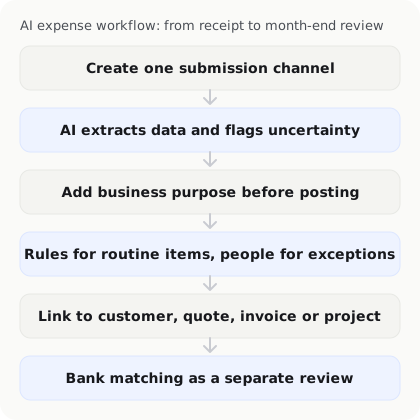
1. Create one primary submission channel
Define the main channel employees should use for receipts, such as a dedicated email address, mobile upload, form, or company workflow tool. The channel does not need to be complicated, but relying on personal messages, shared photo albums, and paper folders at the same time makes it difficult to confirm whether records are complete.
Document the submission deadline, accepted file formats, and what to do when a receipt is missing. Submitting information immediately after payment is usually more reliable than asking employees to reconstruct an entire month at once.
2. Let AI extract data, but flag uncertainty
AI or OCR can extract a merchant name, date, amount, currency, invoice number, and other fields from receipts and bills. This reduces manual entry, but the extracted result should not automatically be treated as a verified accounting record.
The workflow should flag blurry, incomplete, or low-confidence fields so users know what needs checking. Test glare, folds, different layouts, mixed languages, and partially obscured documents to see how the system handles exceptions.
3. Capture the business purpose before posting
A receipt shows an amount, but it may not explain the business purpose. The user may need to add a customer, project, department, payer, or note about a personal portion.
Keep the questions short, such as “Which project was this for?” or “Should this cost be billed to a client?” A short prompt is easier to follow than a long expense form. Defaults can help with common suppliers, but users should still be able to correct them.
4. Use rules for routine transactions and people for exceptions
Recurring expenses such as office rent, software subscriptions, or regular transport costs may be suitable for categorisation or approval rules. AI can use historical records to suggest a treatment, but automation should not conceal unusual transactions.
Route new suppliers, high-value transactions, duplicate receipts, refunds, mixed personal spending, and incomplete records to an exception queue. Each exception should have an owner and a response deadline; otherwise “needs review” becomes an unmonitored holding area.
5. Connect spending to business activity
If expense data remains only as a total, it is difficult to understand how spending affects a customer or project. Where useful, connect expenses to customers, quotes, invoices, or projects so the business can track costs and estimate actual margins.
This does not mean every small expense needs a complex set of fields. Start with work where costs need to be calculated, recharged to a client, or evaluated for profitability, then expand the process based on evidence.
6. Keep bank matching as a separate review step
Receipt records and bank activity are different sources of information. Payment-platform fees, refunds, split payments, combined payments, and card settlements can cause the receipt amount to differ from the amount that actually clears the bank.
AI can suggest a match, but someone still needs to confirm the reason for any difference. Before month-end, list unmatched, duplicate, and inconsistent transactions and keep them in a review state rather than forcing a match just to clear the queue.
Design review and approval controls
An AI workflow needs clear ownership. The submitter may provide the purpose, a team lead may confirm the business need, and a finance owner or bookkeeper may review categorisation and month-end records. The exact structure varies, but one person should not have unlimited ability to submit, change, and approve every transaction without an audit trail.
At minimum, confirm that the workflow supports:
- Editing or returning information before posting.
- A record of who changed what and when.
- Additional approval for high-value or unusual transactions.
- Protection against untracked changes after approval.
- Timely permission changes when someone changes role or leaves.
These controls make it easier to investigate errors and hand clean information to an accountant or finance team.
Test the workflow with a month-end checklist
Do not ask only whether a system “has AI”. Run one complete month-end cycle:
- Collect: Have employees submit suitably redacted sample documents through the normal process.
- Extract: Check dates, amounts, merchants, currencies, and invoice numbers.
- Complete: Add purpose, customer, project, department, and payer information.
- Review: Handle category suggestions, exceptions, new suppliers, and high-value spending.
- Match: Compare expenses with bank activity or payment-platform settlement data.
- Hand off: Export the fields and attachments needed by the accountant or accounting system.
- Review the process: Record common errors, late submissions, and new checking work.
Measure the staff time required for each transaction type, the fields that are often wrong, and the items that still need to be handled outside the system. This helps determine whether the next improvement should be process design, training, or additional software.
Common implementation problems
Automating collection without improving submission rules. If employees do not know when to submit or what information is required, the system will still receive incomplete records.
Treating AI categorisation as the final decision. The same merchant may represent different business purposes, so category suggestions need review and correction controls.
Leaving exceptions undefined. Low-confidence extraction, refunds, duplicate documents, and mixed personal spending need a clear route to resolution.
Ignoring the handoff. Expense information usually ends up with an accountant, finance team, or accounting system. Confirm fields, attachments, and export formats before implementation.
Adding too many tools. If one consistent submission channel solves the main missing-receipt problem, adding several more tools may increase complexity rather than reduce it.
How can an AI business operations agent help with expense management?
An AI business operations agent can support repetitive finance operations such as collecting receipt and bill information, organising expenses, suggesting categories, and connecting spending with customers, quotes, and invoices. InstantFlow is designed to help small businesses manage finance, sales, and administration together, reducing repeated entry and making it easier to understand how costs relate to business activity.

If a business already has an accounting system, it can use InstantFlow as a daily expense and invoicing workflow layer, then define the appropriate handoff and approval process for its accounting backend. Test the workflow with actual document types, permissions, and month-end requirements before adopting it.
Conclusion: establish clear ownership before increasing automation
The goal of AI expense management is not to hand every decision to software. It is to collect receipts earlier, reduce repeated entry, identify exceptions more clearly, and make month-end handoffs easier.
Start with the submission channel, required fields, review ownership, and exception process. Then test one month-end cycle. Once the business understands what can be automated and where human judgement is necessary, it can improve expense management with greater confidence instead of changing the entire process simply because a product is labelled AI.

Michael Tang · Digital Content Manager
Focused on digital content, AI tools and enterprise technology trends, researching and distilling practical information that turns complex technology and AI applications into clear, accessible content for business owners and professionals.