For small businesses, freelancers, and service companies, a quote often starts with a short customer enquiry. Someone must understand the request, choose the right services, calculate quantities and prices, apply discounts, confirm payment terms, and turn the information into a document that can be sent. Rebuilding every quote from an old Word file, spreadsheet, or document template can be slow and error-prone.
An AI quote generator can turn a customer’s message, email, or other request into a quote draft with structured line items and calculations. However, an AI-generated quote is still a draft. Prices, scope, and terms must be checked and approved before the quote is sent.
What is an AI quote generator?
An AI quote generator is a tool that helps create a draft sales quote. A user can enter a customer request, paste enquiry text, or upload an appropriate document so the system can organise possible:
- Product or service items;
- Quantities and units;
- Unit prices, subtotals, and totals;
- Discounts, surcharges, or taxes;
- Quote validity dates;
- Payment and delivery terms;
- Customer and business details.
Some tools only generate text. Others can use product data, price lists, quote templates, and brand information to produce an editable quote. Before choosing one, determine whether it is a text generator, a quote-document tool, or a business system that connects quotes with customer and invoicing workflows.
How is an AI quote generator different from AI quoting software?
The terms are similar, but the scope can be different:
| Type | Main use | Suitable when |
|---|---|---|
| AI quote generator | Turns a customer request into a quote draft and exports a document or PDF | You need to create a quote quickly or your existing process mainly uses documents and spreadsheets |
| AI quoting software | May cover products, customers, quotes, follow-up, approvals, orders, and invoices | You need to manage the full quote-to-cash process and track versions and statuses |

If the main problem is rebuilding quote documents, start by assessing whether a generator can improve that step. If the business also needs quote follow-up, customer management, and invoice creation after acceptance, evaluate the broader sales workflow as well. For how quoting, follow-up, and invoicing fit together, see AI quoting software.
A basic process for generating a quote from a customer enquiry
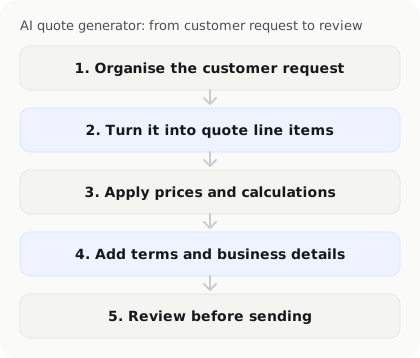
1. Organise the customer’s request
A customer enquiry may contain only a service name and approximate quantity, or it may include attachments, dimensions, a delivery date, or special requirements. Bring the available information into one workflow so the AI has enough context to understand the request.
If the original request is incomplete, the system should flag the missing information rather than fill it with a plausible guess. Dates, quantities, specifications, and delivery scope deserve particular attention.
2. Turn the description into quote line items
AI can turn natural-language information into line items such as service name, quantity, unit, and notes. For design, consulting, construction, repair, or marketing services, this can reduce the time spent copying information from an email into a spreadsheet.
The resulting items may not match the company’s billing structure perfectly. An employee should confirm that the scope is complete and that a customer’s request has not accidentally been treated as a confirmed delivery commitment.
3. Apply prices and calculation rules
A generator can use product data or user-provided prices to calculate subtotals, discounts, and totals. The business should maintain a clear version of its price list and define who can change prices, discounts, and surcharges.
If the AI does not have the current price, it may produce a quote that looks correct but contains the wrong amount. Before sending any quote, check unit prices, quantities, discounts, taxes, and the final total.
4. Add terms and business details
A usable quote usually needs the business name, customer details, quote date, quote number, validity period, payment terms, delivery arrangement, and contact details. A fixed template can provide the consistent information while AI helps fill in the parts that vary by request.
Do not check only whether the layout looks professional. Confirm that the terms fit the work. AI can help organise wording, but it should not make commitments that the business has not approved.
5. Review before sending
An AI quote generator works best as a drafting tool. The responsible person should check:
- Customer details;
- Product or service scope;
- Quantities, units, and unit prices;
- Discounts, taxes, and totals;
- Payment, delivery, and validity terms;
- Any special commitments.
Only after review should the quote be exported as a PDF, spreadsheet, or other format suitable for the customer.
What should you check when choosing an AI quote generator?

Can it read your real business data?
Test the tool with suitably redacted examples from your business, not only the supplier’s demonstration files. Check whether it can handle mixed-language content, attachments, quantities, dates, specifications, and special customer requests.
Can you edit each line item?
The generated quote should let users edit descriptions, quantities, prices, discounts, terms, and customer details. If the only option is to accept the entire AI result, correcting an error becomes difficult.
Can it retain templates and brand information?
Check whether the tool can use your logo, address, contact details, payment information, quote-number format, and standard terms. Templates should reduce repeated setup without preventing item-level editing.
Can it export and hand off the quote?
Confirm whether it supports PDF, spreadsheet, or other formats, and whether an accepted quote can be handed into an order or invoice. Even when a tool offers one-click export, test whether attachments, versions, and change history are retained.
How are prices and data managed?
Understand access to product data, price lists, customer information, and quote drafts. Confirm who can change prices, who can approve discounts, and how permissions are handled when an employee leaves.
Common AI quote-generator mistakes
Treating a customer request as a confirmed scope. An enquiry may be an early idea, not a commitment to deliver a particular service.
Checking only the total. One incorrect quantity, unit price, discount, or tax can make a final total look reasonable while still being wrong.
Using outdated prices. Product and pricing data need an owner and a version. Check the price again before sending the quote.
Ignoring validity dates and payment terms. Unclear terms can lead to different interpretations of price, delivery timing, or payment expectations.
Failing to keep versions. When a customer requests a price or item change, record which version is current and which version was accepted.
Frequently asked questions
Can an AI quote generator decide prices automatically?
It should not be assumed to do so. AI can suggest prices based on product data or pricing rules, but unit prices, discounts, surcharges, and special terms should be checked against the company’s pricing policy and approval permissions.
Is an AI quote generator suitable for freelancers and small businesses?
It can help when you regularly combine services, quantities, and prices based on customer requests and spend time copying information from emails or messages into quote templates. If every quote is nearly identical, a clear template may be enough.
How can I make sure an AI-generated quote is complete?
Use a pre-send checklist covering the customer request, items, quantities, prices, discounts, payment terms, and validity period. Ask the customer to clarify unclear specifications instead of allowing the AI to guess.
Can an AI quote generator export PDF or spreadsheet files?
Formats vary by tool. Test PDF, spreadsheet, and other outputs against the way your business delivers quotes and handles them internally. Check not only the layout but also whether all items, terms, and quote numbers are retained.
Can an accepted quote be turned into an invoice with one click?
Some workflows can hand a verified or accepted quote into an invoice draft. Even when one-click invoicing is available, check the customer, items, quantities, prices, taxes, and payment terms so the invoice matches the valid quote.
How can an AI business operations agent help generate quotes?
An AI business operations agent can help organise customer requests, create quote drafts, record changes and follow-up status, and connect quote information with customers, invoices, and other daily operations. InstantFlow is designed to help small businesses reduce repeated entry and follow the process from customer enquiry through quoting and invoicing.
Keep human review for prices, terms, versions, and invoice handoff, and test the workflow with your actual enquiries and product data.
Conclusion: let AI create the draft, then verify the quote
The value of an AI quote generator is not only that it can produce a document quickly. It can help turn a customer request into clear line items while reducing repetitive entry and formatting work.
Organise product and pricing data, define templates and approval rules, and test the process with realistic enquiries. When the business knows what the AI generated, what people must verify, and how an accepted quote moves into invoicing, it can speed up quoting more safely.

Michael Tang · Digital Content Manager
Focused on digital content, AI tools and enterprise technology trends, researching and distilling practical information that turns complex technology and AI applications into clear, accessible content for business owners and professionals.