For a small business, quoting is more than placing products and prices into a document. Before a quote is created, someone needs to understand the customer’s request, choose the right items, calculate quantities and discounts, and confirm the scope. After the quote is sent, the team may need to answer questions, prepare revisions, follow up, and turn an accepted quote into an order or invoice.
AI quoting software can help organise these repetitive tasks, but it does not mean every quote should be sent without human review. A useful AI quoting process makes quotes faster, clearer, and easier to track while keeping control over prices, terms, and customer communication.
What can AI quoting software do?
Depending on the product, AI quoting software may help with:
- Organising products or services from a customer request;
- Finding relevant information from a product catalogue or previous quotes;
- Creating a draft quote with item details;
- Flagging missing quantities, discounts, validity dates, or payment terms;
- Preparing quote variations for different customers or projects;
- Recording quote status and the next follow-up action;
- Handing accepted quote details into an order, invoice, or payment workflow.
The important distinction is whether the system only helps write text or can work with the business’s product data, pricing rules, customer records, and sales process. Confirm which information AI recommends and which details require employee approval.
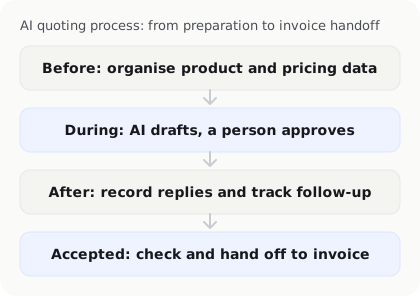
Before quoting: organise product and pricing data
AI cannot reliably use a product list that is inconsistent, outdated, or contradictory. Before implementation, organise:
- Product or service names and descriptions;
- Units, quantities, and prices;
- Customer- or project-specific pricing;
- Discount, minimum-charge, and surcharge rules;
- Delivery scope, timelines, and limitations;
- Quote validity periods and payment terms;
- Items that require additional approval.
If the price list has no clear version, AI may combine old and new prices. Assign an owner for the data and regularly retire or clearly mark obsolete information.
During quoting: use AI for a draft, not the final decision
Customers often describe what they need in a few sentences. AI can help turn that request into products or service items and produce a draft quote. An employee should still check the scope, quantity, unit, discount, and delivery terms.
Pay particular attention when:
- The customer’s request may have been misunderstood;
- The quote includes an unconfirmed service;
- Product specifications or quantities do not match the conversation;
- A discount exceeds the company’s approval limit;
- The wording could create an unclear commitment.
AI can generate wording quickly, but speed does not guarantee that prices or commercial terms are correct. Keep a clear human approval step before sending a quote.
After quoting: make follow-up trackable
Many businesses can create a quote quickly but do not follow up consistently. The quoting system should record the quote date, expiry date, customer response, revision history, and next action.
Follow-up reminders should not simply send the same message repeatedly. The owner should know whether the customer has a question, requested a price change, is waiting for internal approval, or needs a different follow-up time. AI can organise conversations and suggest reminders, but the timing and tone should fit the customer relationship and company policy.
Prevent quote-version confusion
A customer may receive an original quote, one or more revisions, and a final accepted version. Without clear version history, a team member may create an order from an old price or include unaccepted items on an invoice.
For every revision, retain:
- The date and version number;
- Changed items, quantities, or prices;
- The person who made and approved the change;
- The version accepted by the customer;
- The downstream process available after acceptance.
Software can help compare versions, but the business still needs to define which version is valid and whether an accepted quote can be changed without starting a new approval step.
How should quotes connect to invoices?
Once a quote is accepted, the business should not need to re-enter every detail. A useful process can pass the customer, items, quantities, prices, discounts, and payment terms into an order or invoice draft for review.

Check that:
- Customer information is correct;
- Quote and invoice items match;
- Taxes, discounts, and surcharges are correct;
- Invoice dates and payment terms are appropriate;
- Cancellations or quote changes do not leave outdated drafts active.
If the system only copies quote text into an invoice without retaining approval status and version history, duplicate entry and incorrect invoices can still occur.
Review and permission controls for AI quoting software
Different responsibilities should have different permissions. Sales staff may create quote drafts, managers may approve special discounts, and finance staff may verify payment and invoice details.
Confirm:
- Who can change prices or add discounts?
- Which quotes require extra approval?
- Who can edit an accepted quote?
- Does an edit trigger approval again?
- Are quote, communication, and invoicing records retained?
These controls reduce errors and make it easier to understand how a price was decided and changed.
Test the AI quoting process with real sales cases
Do not test only one simple product. Prepare suitably redacted examples covering:
- A single product with a fixed price;
- Multiple services and quantities;
- A customer requiring a discount or special terms;
- A request to change items or quantities;
- A quote that expires and needs to be recreated;
- An accepted quote handed into an invoice;
- A transaction that exceeds price or discount permissions.
Record the time needed to produce a draft, the changes employees make, whether versions remain clear, and whether handoff still requires duplicate entry. These results are more useful than simply comparing whether products have an “AI” label.
Frequently asked questions
Can AI quoting software decide prices automatically?
It should not be assumed to do so. AI can suggest prices based on product data and pricing rules, but prices, discounts, minimum charges, and special terms should follow the company’s permission and approval process.
Which small businesses benefit most from AI quoting software?
It may be useful for businesses that regularly combine products, services, quantities, and discounts for customers and need repeated follow-up and invoicing. If quotes are rare or the catalogue is very simple, improving data organisation and templates may be enough.
How can a business prevent AI from using outdated prices?
Maintain a clear product and pricing source, assign a data owner, include effective dates and versions, and retire old information. In InstantFlow, when an item’s price is updated, the shared price data is updated so new quotes and invoices use the current price without requiring each one to be configured again. Already-issued documents should still be handled according to the company’s record and revision policy.
Should a revised quote be approved again?
If the revision changes price, discount, delivery scope, or payment terms, it should usually go through the company’s approval rules again. The system should retain before-and-after versions so the team knows which version the customer accepted.
Can AI quoting software create an invoice immediately?
Some workflows can turn an accepted quote into an invoice draft, but the customer, items, prices, taxes, and payment terms still need to be checked. If an invoice is needed immediately, InstantFlow can also help generate it with one click, reducing repeated work between quoting and invoicing.
How can an AI business operations agent help with quoting and invoicing?
An AI business operations agent can help organise customer requests, create quote drafts, track quote status, and connect spending, customers, quotes, and invoices. InstantFlow is designed to help small businesses manage finance, sales, and administration together, reducing repeated entry and making the daily process from quote to invoice easier to follow.
Keep human review for prices, discounts, versions, and invoice handoff, and test the workflow with the company’s actual product data and sales cases.
Conclusion: organise the data before asking AI to speed up quoting
The main value of AI quoting software is not only producing a document faster. It is helping connect product data, customer needs, pricing approval, follow-up, and invoice handoff into a trackable process.
Organise product and pricing data first, define review and permission controls, and test realistic sales cases. When the business knows what AI recommends, what staff must approve, and how accepted quotes move into invoicing, it can improve both quoting speed and accuracy.

Michael Tang · Digital Content Manager
Focused on digital content, AI tools and enterprise technology trends, researching and distilling practical information that turns complex technology and AI applications into clear, accessible content for business owners and professionals.